Dashboards · SimHub (iPad, iPhone, PC window) · Le Mans Ultimate
LMU HUD (iPad)
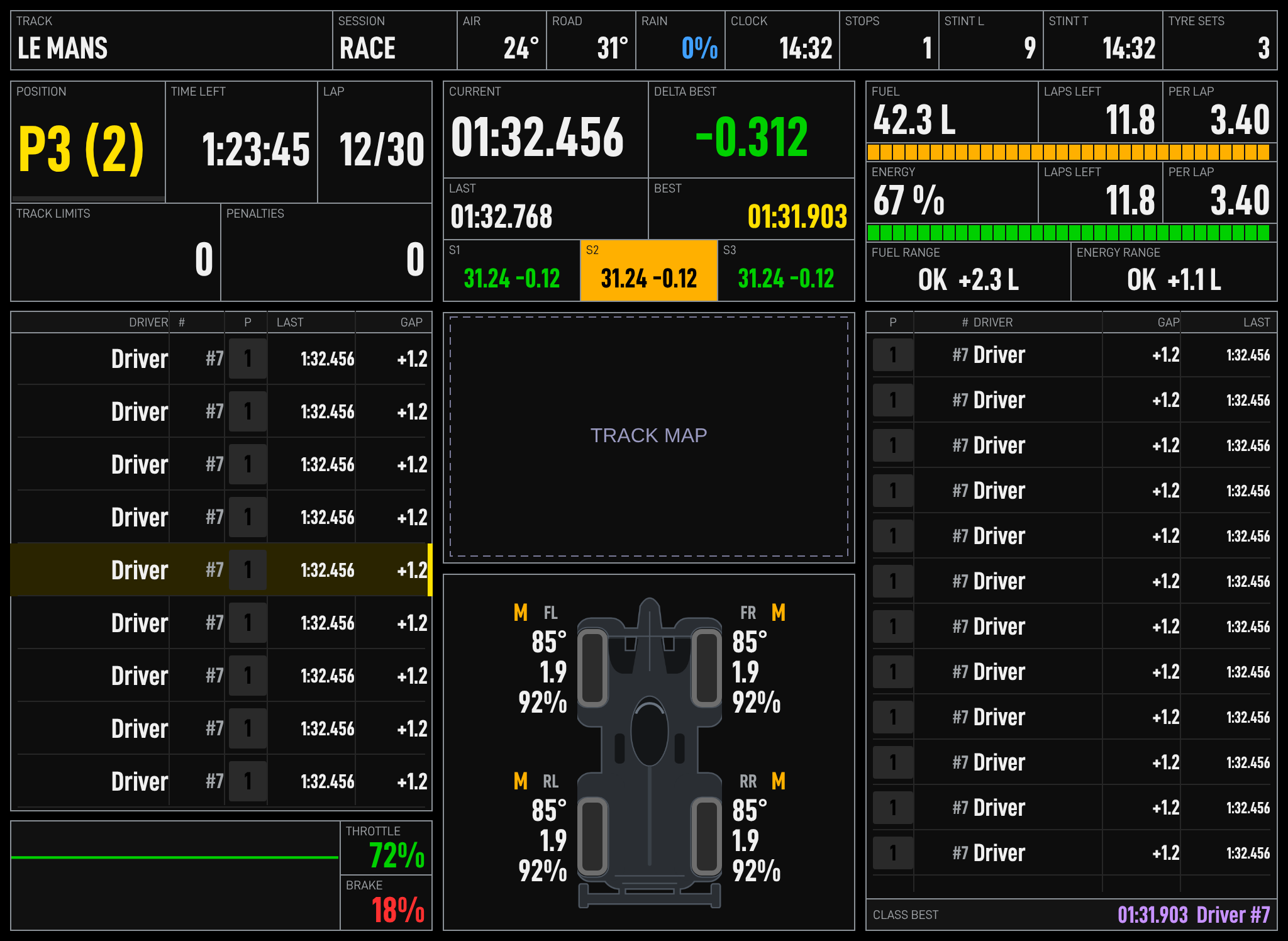
A SimHub dashboard that makes an iPad the second screen: standings, relative, lap times and sectors, fuel and energy, tyres and damage on one page.
Download LMU_HUD_iPad.simhubdash
Install
- Double-click the .simhubdash file or use Import on the SimHub dashboards screen.
- On an iPad or iPhone, open SimHub's Dash Web address in the browser and pick this dashboard. The fonts are in the package; nothing to install.
About
A 1024×748 layout for a landscape iPad (4:3), shown through SimHub's Dash Web. It gathers what a race needs so the in-game HUD can stay off.
The top line is track, session, air and road temperature, rain, game clock, stops and stint. Left: position, time left and lap, track limits and penalties, then the relative (four cars each way, your row in yellow) and throttle/brake. Centre: the track map and a car diagram (tyre temperature, pressure and tread left, compound, body damage). Right: current, last and best lap with the delta, sectors, laps left on fuel and energy, and the class standings.
Colour means state only: red when slower than best, amber for a slow sector, amber/red when fuel or energy runs short, blue/red for cold or hot tyres, and damage tints that part of the car. Class colours are Hypercar red, LMP2 blue, LMP3 purple, GT3 green; compounds hard red, medium yellow, soft white, wet sky blue.
In the relative, a lapped car is blue, a car a lap ahead orange, and the class's fastest lap shows as a purple lap time. Gap and position sit on the right, where the wheel hand does not cover them.
Fonts are bundled. The energy cells only have values in Le Mans Ultimate.
This dashboard is generated from code in dashboards/ipad-hud/ in the repository. To change something, look at generate.py in that folder.