Dashboards · MOZA Pit House (wheel / CM screen) · Le Mans Ultimate
Peugeot 9X8
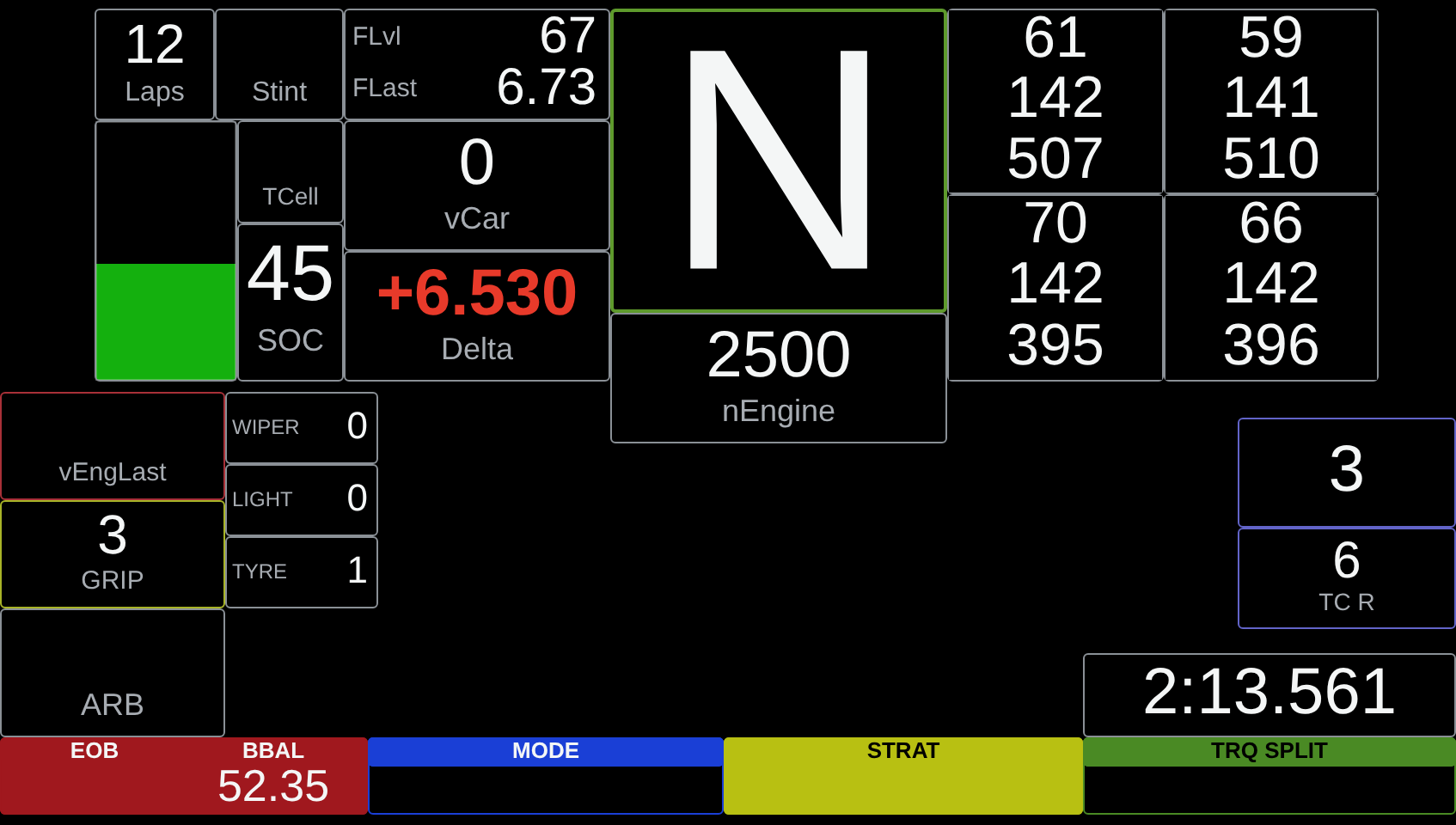
The real Peugeot 9X8 wheel screen from Le Mans Ultimate, moved onto the MOZA FSR2.
Download Peugeot_9X8_FSR2.mzdash
Install
- If it is a zip, unzip it, then use Import on the Pit House dashboard screen and pick the .mzdash file. If there is a Resource folder, keep it next to the file.
- If a dashboard with the same name already exists, Pit House silently refuses. Delete the old one first when installing a new version.
About
It follows the real screen's layout: laps and stint, the battery gauge and SOC, energy (FLvl, FLast), speed and delta on the left; a large gear and the revs in the middle; four tyres (temperature, pressure, brake temperature) on the right; vEngLast, GRIP, ARB, wiper, light and tyre cells, position, TC R and the last lap below; EOB / BBAL, MODE, STRAT and TRQ SPLIT along the foot.
With the pit limiter on, PIT banners stand on both sides; flags show in the same place in their colour. The gear box fills green while the motor drives, tyre cells go blue when cold and red when hot, the delta turns red when slower. The empty middle shows an orange warning only when water temperature, energy or fuel passes a limit.
Switching the ignition off blanks the screen like the car, leaving PEUGEOT / 9X8.
Cells the real screen has but the game gives no value for (Stint, TCell, ARB, EOB, MODE, STRAT, TRQ SPLIT) carry their label and stay empty.
For the 847×480 FSR2 wheel screen. If Pit House already has a dashboard of the same name, delete it before importing.
This dashboard is generated from code in dashboards/peugeot-9x8/ in the repository. To change something, look at generate.py in that folder.